Customer service metrics
Escalation management that gets the hard cases to your experts before the customer has to ask
Escalation management is how a support team decides which conversations move up a level, who picks them up, and how fast. Done well, the customer barely notices the handoff.
The rules worth writing down#
Every escalation policy answers the same three questions: which conversations go up, who picks them up, and how quickly. Most teams answer them from memory, which works fine until the one person who knows the rules is on holiday.
So write the triggers down as plainly as you can. A refund over €200, a damaged item, a customer who mentions a chargeback, a bug report. Give each one an owner, meaning a named person or team rather than "whoever's free", and a response time the customer is actually told about.
Escalation process, step by step#
- Something trips a trigger: one of your rules, a request for a person, or an answer the AI isn't sure about.
- The conversation lands with the right owner, with everything said so far attached.
- The customer hears what happens next and roughly when.
- Someone takes over, sorts it out, and closes it or hands it back.
- Later, you check whether the trigger was the right one.
Most teams skip that last step, which is how a trigger nobody needs any more survives for years.
Low escalation isn't a win#
A team that almost never escalates is usually guessing, and the customer pays for the wrong guesses. Your escalation rate can't tell good handoffs from bad ones on its own.
What can is looking at what changed after the handoff. If a supervisor approves the refund the frontline proposed nine times out of ten, the trigger's too cautious, so push that decision down (or into your AI's playbook). If they keep reversing decisions, your rules aren't clear enough yet.
How Hay.chat escalates#
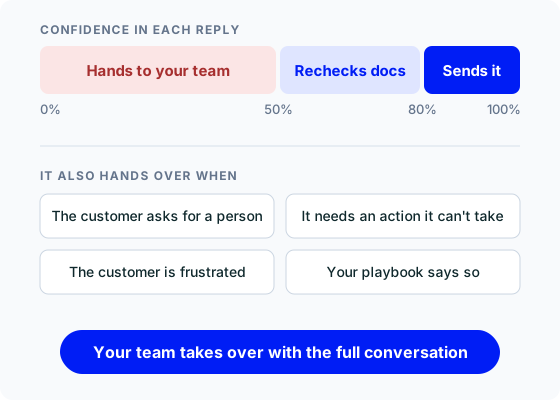
Hay.chat scores its confidence in every reply before sending it. By default, a reply scoring 80% or more goes out. Between 50 and 80%, Hay.chat pulls more of your docs and tries again, and under 50% it hands the conversation to your team instead of guessing. You can change both thresholds.
It also hands over when a customer asks for a person, when a request needs an action it can't take, or when the customer is clearly frustrated. Your playbooks add your own triggers on top, like that refund limit.
Escalated conversations wait in your queue marked Needs Attention. Whoever picks one up clicks Take Over, Hay.chat stops replying, and they see the whole conversation. When they're done they can hand it back to Hay.chat or return it to the queue. If your team works in Chatwoot, Hay.chat can assign the conversation to the team you choose.
Measuring escalations#
Hay.chat's dashboard shows escalations for today and this week, with the share of conversations that escalated. Read through them once a week. Each one is either a case that really needed a person, or a gap (a missing doc, a playbook without the right step) you can close. The second kind should shrink over time, while the first never will (and shouldn't). Our guide to customer service KPIs covers how escalation rate fits next to the rest.
 30-day free trial