Customer service metrics
Why your containment rate looks better than your support feels, and how to fix the formula
Containment rate is the percentage of conversations an AI chatbot or virtual agent finishes without handing them to a person. It's the number most AI support vendors sell on, and it's easy to inflate.
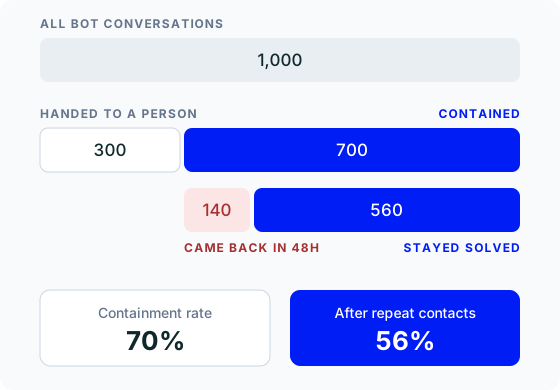
The containment rate formula#
Containment rate = conversations the bot finished without a person ÷ all conversations the bot started × 100.
If your AI agent handled 1,000 conversations last month and handed 300 of them to your team, your containment rate is 70%.
Before you calculate it, decide what counts as a handoff. Explicit escalations do, and so does a customer typing "let me speak to a human". The one most dashboards miss is the customer who gives up on chat and emails you instead.
What's a good chatbot containment rate?#
It depends on what the bot can actually do. A bot that can only quote your help centre hits a ceiling fast, because most tickets need someone to check or change something. One that can look up an order, update an address or issue a refund within your rules gets much further.
Hay.chat's own guidance is that 60 to 70% is normal in the first weeks, and 80 to 90% is achievable once the docs and playbooks have been tuned. Treat any vendor's benchmark (ours included) as a ceiling, not a promise.
Where containment rate misleads#
A conversation counts as contained if the customer leaves without a handoff. That includes the customer who gave up. They close the chat window, email you the next morning, and now one problem has cost you two contacts, while your dashboard shows a win.
The fix is to subtract them. Of the conversations the bot contained, how many customers came back about the same thing within 48 hours? In the example above, 140 of the 700 did, so the real figure is 56%, not 70%. That second number is the one to plan your automation around.
So a higher containment rate isn't automatically better. A bot that never escalates would score 100%, and it'd be the worst support you've ever offered.
How Hay.chat reports containment#
The Resolution Rate on Hay.chat's dashboard is containment by another name: the share of conversations the AI solved without a person stepping in. Next to it, the human escalations widget shows how many conversations were handed over today and this week.
Escalation is built in on purpose. Hay.chat scores its confidence in every reply, and when it's low it passes the conversation to your team instead of guessing. So when the resolution rate climbs, read a sample of resolved conversations and check customers aren't simply giving up. When it stalls, the escalations usually point to a missing doc, or a playbook that needs one more action.
 30-day free trial