Set up your assistant by answering real questions

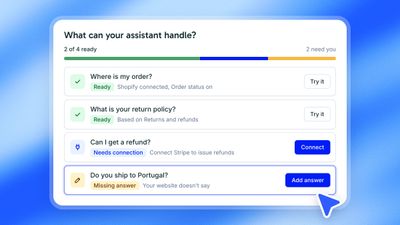
Setting up Hay.chat used to start with a getting-started checklist. It now starts with your customers. New accounts open on a setup board: a list of the questions your customers ask most, each one tested on your assistant, with what is left to do beside it. It is live for every plan, on the hosted service and for self-hosted installs.
Three questions, then a list that is yours#
Setup asks three things: what kind of business you run, which tools you already use, and what customers ask you most. While you answer, Hay.chat reads your website, so the suggestions fit your business and the list is ready when you finish. You can remove the questions that do not fit and add your own.
See what your assistant can handle today#
Every question on the board has a status. Ready means the assistant was tested on that question and answered it, from a page on your site or through a connected tool. Missing answer means your website does not say. Needs connection means the assistant has to reach a platform such as Shopify or Stripe before it can act.
Each one is fixed where it sits. Write the answer yourself or let Hay.chat draft it from your documents. Connect the platform. Review the playbook Hay.chat wrote from that platform's tools and turn it on. The row is checked again and moves to Ready.
Try it before your customers do#
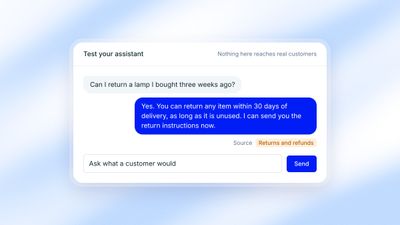
A test chat sits beside the board. Ask anything a customer would and you see the reply together with the source it came from. Nothing in the test chat reaches real customers.
Nothing goes live by accident#
A playbook does nothing for customers until you turn it on. You can add the chat to your site before every row is ready: the assistant hands the questions it cannot answer yet to your team instead of guessing.
Setup can be left and picked up at any point, and owners and admins can open it again from the sidebar. If you already have conversations from another tool, you can import them and see how your assistant would have replied.
Start a 30-day free trial to set up your own.
Ask AI about this page
About the Author

Roger Junior
Co-Founder, Product and Engineering
Roger designs and builds Hay.chat's architecture. Before this he was a UX/UI designer working with international development teams at global companies, and he's now the technical founder behind the product.