Ecommerce operations
RMA numbers explained: return merchandise authorization without the back-and-forth
RMA numbers are the references a seller issues to approve a return before anything ships back. RMA stands for return merchandise authorization, and the number links the returned box to its order and to what was agreed.
What is an RMA number?#
It's a permission slip with a reference on it. The customer asks to send something back, you check the request against your returns policy, and if it passes you issue the number, usually with a return label.
The format doesn't matter much. RMA-10482 works, and so does the return ID your store platform generates. What matters is that the number shows up on the label and in your system, and that it links back to the order.
What is RMA in shipping?#
In shipping, the RMA is how the warehouse knows what's inside a box before anyone opens it. A parcel that turns up with a valid RMA on the label gets matched to its order and processed. One that turns up without one goes on a shelf until somebody has time to play detective.
That's the real reason return authorization exists: it stops returns arriving that you never agreed to take.
The RMA process, step by step#
- The customer asks to return something, by email, chat or a returns portal.
- You check it's eligible: inside the return window, and not a final-sale item.
- You issue the RMA number with a return label and packing instructions.
- The warehouse receives the item and checks its condition against the reason given.
- You close it out with a refund or an exchange, and let the customer know.
Most of the RMA process shouldn't sit in a queue#
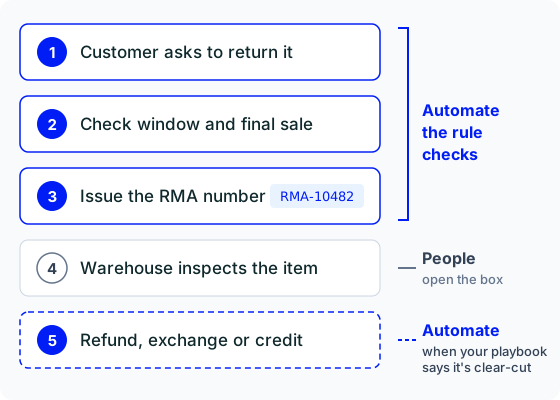
Steps one to three are rule-checking. The order date's either inside the window or it isn't, and the item's either final sale or it isn't. Yet in plenty of stores those steps wait in a ticket queue for a day while someone looks up the same facts.
Step five can be automated too. A refund, exchange or credit is safe to hand over when your playbook spells out what a clear-cut case looks like: the item's back, it was returned inside the window, it's in the condition the customer described, and it's under the value you're happy to approve without a second look. Anything outside those rules goes to your team.
Writing that protocol is on you, and so is keeping it current. Automated refunds are only as safe as the rules behind them, so review the cases that got escalated and tighten the playbook as your products and policies change. Step four stays with whoever opens the box.
How Hay.chat handles return authorization#
With Shopify connected, Hay.chat checks which items on an order are eligible for a return and opens the return for them. The return reference Shopify creates is your RMA. When your playbook marks a case as clear-cut, Hay.chat previews the refund and issues it, and it can never refund more than Shopify says is refundable. Connect Stripe and it can process exchanges as well as refunds. On WooCommerce it can issue refunds too, and create a coupon when a goodwill gesture is the better fix.
When a request doesn't fit the rules (a damaged item, say, or a return two days past the window), Hay.chat passes it to your team with the order and the conversation attached. The full list of what it can do is on the actions page.
 30-day free trial